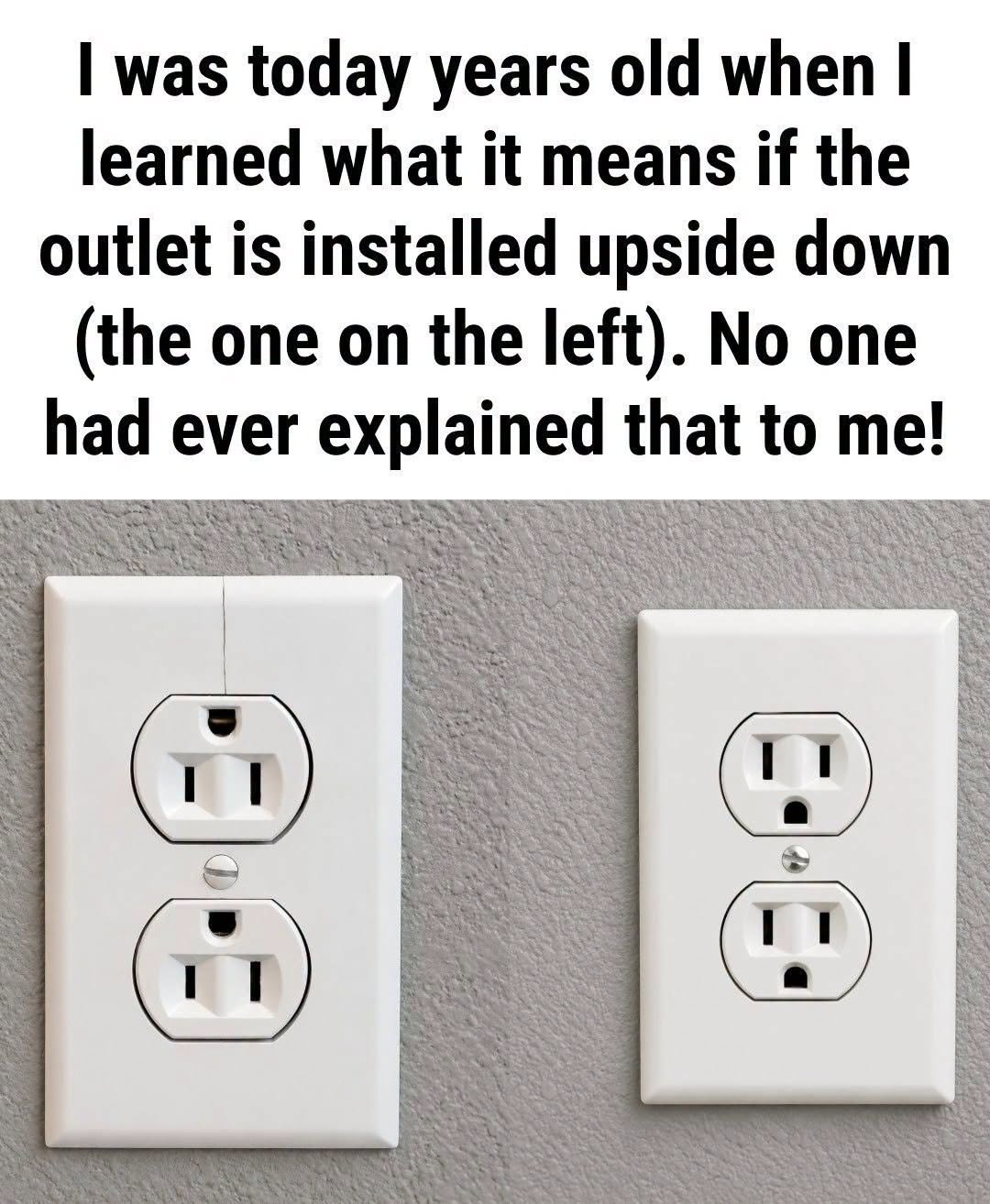
If you’ve ever noticed an electrical outlet installed upside down, you may have wondered whether an electrician made a mistake. After all, most residential outlets have the grounding opening positioned at the bottom, so seeing one reversed can look unusual.
However, an upside-down outlet isn’t necessarily an installation error. In some homes, the orientation is used as a visual indicator that the receptacle is controlled by a wall switch.
That said, there is an important distinction: an upside-down electrical outlet does not automatically mean it is switch-controlled. Outlet orientation can vary depending on the electrician, homeowner, local practices, and the way the electrical system was originally installed.
What Does an Upside-Down Outlet Usually Mean?
In some homes, an upside-down receptacle indicates that it is a switched outlet. A wall switch may control electricity to all or part of the receptacle, allowing a homeowner to turn a lamp on or off from across the room.
This setup is particularly common in rooms that were not originally designed with a permanent ceiling light. Instead of installing an overhead fixture, an electrician or builder may have wired a wall switch to a receptacle.
You can then plug a table lamp or floor lamp into the switched portion of the outlet and operate it using the wall switch.
One Outlet Can Have Two Different Functions
In many installations, only one half of a duplex receptacle is controlled by the wall switch.
The other half may remain energized at all times. This arrangement allows you to use the always-on portion for devices such as a clock or charger while connecting a lamp to the switched portion.
However, configurations vary, so you should not assume that an upside-down outlet has this arrangement without testing it.
An Upside-Down Outlet Can Be a Visual Cue
One reason electricians may install a receptacle in a different orientation is to make its function easier to recognize.
A flipped outlet can serve as a quick visual cue for homeowners, electricians, renters, or future occupants that the receptacle may have a special function, such as being controlled by a nearby wall switch.
This can be especially helpful in bedrooms, living rooms, dens, and older homes where lighting may be provided by lamps rather than ceiling fixtures.
There Is No Universal Rule Requiring Switched Outlets to Be Upside Down
This is one of the most important points to understand.
There isn’t a universal residential electrical rule requiring every switch-controlled receptacle to be installed upside down. Electrical requirements can depend on the applicable code, jurisdiction, and installation circumstances, while receptacle orientation itself may be an installer preference or convention.
Some electricians use an upside-down orientation to identify switched receptacles. Others install every receptacle in the same orientation throughout a home.
An outlet may also be upside down for completely unrelated reasons. For example, someone may have replaced a receptacle and installed it in that position simply because of personal preference.
So, an upside-down outlet can be a clue, but it is not proof of a switched circuit.
How to Check Whether an Outlet Is Controlled by a Wall Switch
You don’t need to remove the outlet cover or touch electrical wiring to check whether a receptacle is switch-controlled.
A simple lamp can often help.
- Plug a lamp into one half of the receptacle.
- Turn the lamp on.
- Try the nearby wall switches.
- If the lamp turns off and on when you operate a particular switch, you’ve identified a switched portion of the receptacle.
- Test the other half separately if necessary.
If neither half responds, the switch may control a different outlet, an overhead fixture, an exterior light, or another part of the electrical system.
When testing, avoid opening the electrical box or handling wiring. If something appears damaged or behaves unexpectedly, stop and have a qualified electrician inspect it.
Why Are Some Outlets Installed With the Grounding Opening on Top?
For Complete Cooking STEPS Please Head On Over To Next Page Or Open button (>)